Here is the scenario: you are writing auth code and you need to verify your hashing implementation is correct. You want to confirm that a particular password combined with a known salt and iteration count produces the expected PBKDF2 output. Or you are writing tests and need to generate pre-hashed values for database fixtures. The instinct is to run a quick code snippet or find an online tool. The problem with the online tool is obvious when you think about it: you are typing a password into a website, even if it is a test one.
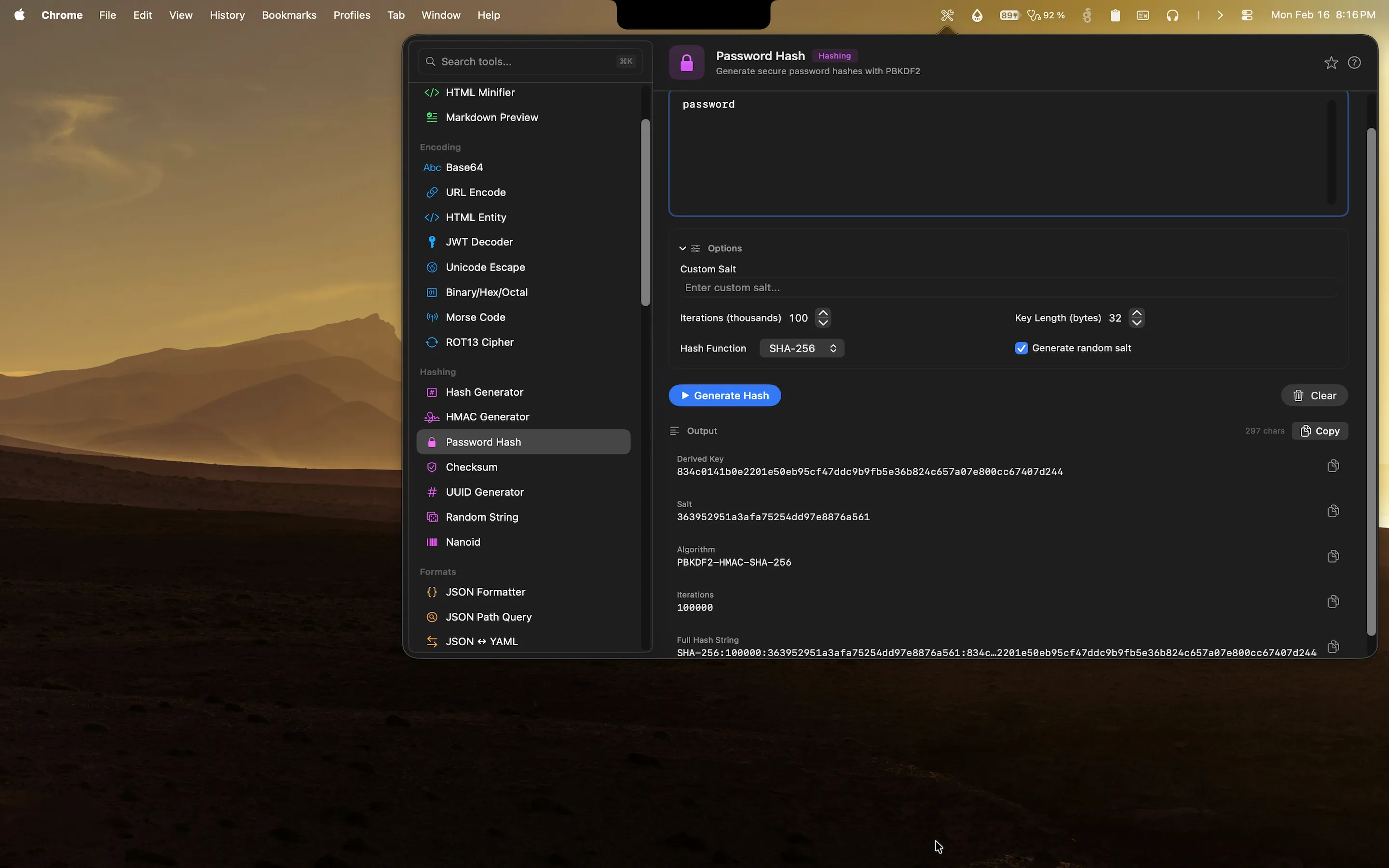
Devly has a password hashing tool that runs entirely on your Mac. No network request, no third-party server, no data sent anywhere. You paste the password and salt, configure the parameters, and get the hash output locally.
Why password hashing requires care even in development
Developers often use realistic-looking data in test environments. Real-looking email addresses, passwords that follow common patterns, names that look like real people. In some cases, developers use actual data from production snapshots to get realistic test scenarios. Pasting any of this into an online hashing tool is a risk, and not just because of the obvious data exposure concern.
It is also a habit problem. If you get comfortable pasting credentials into online tools when they are "just test data", you are building the reflex of reaching for online tools when you need to hash something. That reflex does not turn off cleanly when the data is real. Using a local tool by default is the safer pattern, and it costs nothing to adopt it because a local tool is also faster.
What developers use password hashing tools for
The use cases are more varied than they might initially seem:
- Implementation verification. You have written a PBKDF2 implementation in your application and you want to confirm the output matches a known reference value for a given set of parameters. This is the first thing you should do after implementing any cryptographic function.
- Test fixture generation. Your tests need database records with pre-hashed passwords. You generate the hash locally, store it in your fixture file, and your tests run against it without needing to hash at test time.
- Hash configuration comparison. You want to see how changing the iteration count affects the hash output, or whether increasing the key length changes performance characteristics. A quick local tool makes this comparison straightforward.
- Auth failure debugging. You suspect the hash stored in the database does not match the hash your application is generating for the same password. Being able to reproduce the hash locally with exact parameters helps narrow down where the mismatch is happening.
How Devly handles password hashing on Mac
Devly has a password hashing tool that supports PBKDF2 with SHA-256 and SHA-512 as the underlying pseudorandom function. You specify the password, salt, iteration count, and output length. The tool computes the hash immediately and displays the output in both hex and Base64 encoding. Everything runs on your Mac using the system's cryptographic libraries.
The interface is direct: input the parameters, see the output. There is no configuration wizard, no account required, no session that persists between uses. Open Devly, find the password hash tool, enter your parameters, copy the result.
Custom salt input
Devly lets you specify a custom salt or generate a random one. When you are verifying a known hash, you need to use the exact same salt that was used to generate the original. When you are generating a new hash for a test fixture, you can generate a cryptographically random salt and copy it alongside the hash output. Both the salt and the hash go into your fixture file so your tests can verify against them correctly.
General hash generation alongside password hashing
Devly also has a standard hash generator for MD5, SHA-1, SHA-256, SHA-384, and SHA-512 in the same app. If you need a quick SHA-256 of a string without the key derivation function overhead, that tool is one search away in the same Devly window. They live in the same security category because they are complementary operations.
Secure hashing that stays on your Mac
PBKDF2, SHA-256, HMAC, and more. All processing is local. One-time $4.99, no accounts required.
Security tooling and local-first processing
Everything in Devly's security and hashing category processes locally. No network requests are made when you use the password hash tool, the general hash generator, the HMAC generator, or any other security tool. The input you paste into the password hash tool exists only in memory for the duration of that session. Close Devly and nothing is retained anywhere.
This is the right default for security tooling. Any tool that involves credentials, keys, or sensitive values should be local by default. The fact that it is also faster than an online tool is a bonus, but the local-first approach is the primary reason to choose a native tool for this category of work.
The broader security toolkit in Devly
Password hashing is part of a larger set of security-adjacent tools in Devly. You have HMAC generation for API signature verification (useful when debugging webhook signatures or signed API requests). You have UUID generation for creating cryptographically random identifiers. You have cryptographic random string generation for secrets, tokens, and API keys. You have file checksum verification for validating build artifacts or downloaded binaries against their published hashes.
They all belong to the same mental category: working with cryptographic operations during development. Having them in one place, accessible through the same interface, means less context switching when a task involves multiple cryptographic steps. You are not maintaining browser bookmarks for five different online tools that each do one thing. You open Devly and find what you need.
For anyone who builds applications with authentication, signs API requests, or works with any kind of cryptographic verification, having these tools readily available on your Mac is the kind of infrastructure improvement that pays off immediately and keeps paying off every day.