You see a firewall rule blocking port 5432. Is that Postgres? You are reading a Docker Compose file with a ports mapping you did not write. What is on 8080, is it HTTP or something else? You are configuring a load balancer and need to confirm which protocol runs on 443 versus 8443. These questions come up constantly and the answer is almost always a quick web search away. But that web search is still slower than having the reference immediately available, and it sends you to a Wikipedia table when you just need one line of information.
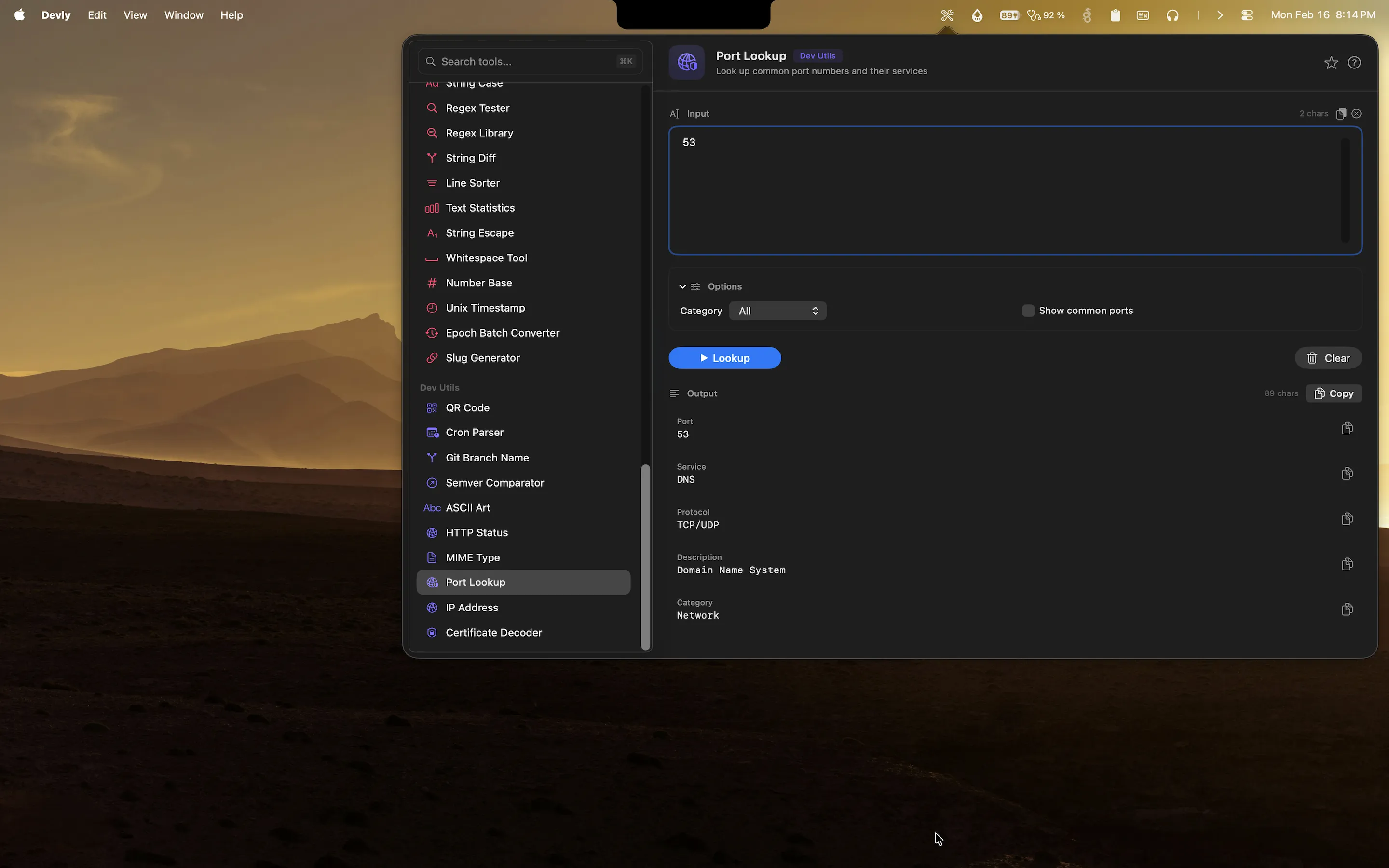
Devly has a port number reference built in. Type the port, get the service. Type the service, get the port. No browser tab, no scrolling through a table. The answer is in Devly in under a second.
Port numbers every developer should know (but doesn't always)
There is a handful of port numbers that most developers have memorized from sheer repetition: 22 for SSH, 80 for HTTP, 443 for HTTPS, 3306 for MySQL, 5432 for PostgreSQL. But the list of ports you encounter in real infrastructure work is much longer than that, and the less-common ones require a lookup every time.
- 6379 (Redis): The default Redis port. You see this in connection strings, environment variables, and Docker Compose files constantly.
- 27017 (MongoDB): The MongoDB default. Easy to forget if you are not using it daily.
- 9200 (Elasticsearch): The HTTP API port. The transport port is 9300.
- 5672 (AMQP / RabbitMQ): The AMQP protocol port used by RabbitMQ and other message brokers.
- 8080 (HTTP alternate): Commonly used for dev servers, proxies, and secondary HTTP services when 80 is already in use.
- 8443 (HTTPS alternate): The HTTPS equivalent of 8080. Used for dev HTTPS or secondary secure services.
- 5601 (Kibana): The default Kibana web interface port.
- 2181 (ZooKeeper): The ZooKeeper client port, relevant if you work with Kafka or older Hadoop infrastructure.
Most developers have a handful of these memorized and have to look up the rest. The lookup is fast, but it breaks flow. Having it in Devly is faster than having it in a browser.
Where you need port lookups in practice
Writing or reviewing firewall rules and security group configurations. You are reviewing a Terraform module for a VPC security group and you see an ingress rule for port 6379. Is that intentional? Knowing it is Redis immediately tells you whether it should be publicly accessible (no) and what kind of traffic it carries.
Reading Docker Compose files or Kubernetes service definitions written by others. A ports mapping like 9200:9200 is meaningful if you know that is Elasticsearch. A service exposing port 5672 without documentation becomes immediately clear once you know it is AMQP.
Debugging network connectivity issues. When a service cannot connect to another service, knowing what protocol each port carries helps you ask the right questions. Is the issue TLS? Is there a proxy in the way? Is the port actually reachable from this network segment?
Configuring reverse proxies, load balancers, and ingress controllers. When you are writing nginx or Caddy config that routes based on ports, knowing what each port means keeps the configuration readable and correctly reasoned.
How Devly handles port lookups on Mac
Devly has a port number reference that lets you look up any port number instantly. Type a port number and see the associated service name, protocol (TCP/UDP), and a brief description. The results are immediate as you type, so you do not have to finish entering the port number before seeing results.
The reference covers well-known ports (0-1023), registered ports (1024-49151), and the common dynamic ports that developers actually encounter. It is not trying to replicate the full IANA database. It is a practical reference for everyday development work.
Works both ways: port to service and service to port
The lookup works in both directions. Enter 6379 and get Redis. Enter "elasticsearch" and get 9200. Useful when you are writing configuration and need the port for a specific service, or when you are reading configuration and need to understand what a port number means. Both directions are equally fast and use the same search interface.
HTTP status codes reference too
Devly also has an HTTP status code reference. If you see a 422 in a log and need to remember what that means (Unprocessable Entity), it is one search away. A 502 is Bad Gateway. A 429 is Too Many Requests. The status code reference includes the name, description, and common use cases for each code. If you are reading logs and debugging API failures, having the status code reference alongside the port reference means you can stay in Devly for both lookups.
Port lookups and more, always in your menu bar
Devly has port references, HTTP status codes, MIME types, and 50+ other developer tools. One-time $4.99.
Reference tools in Devly
Port lookup and HTTP status codes are part of a category of reference tools in Devly. You also have MIME type lookup: what is the content type for .webp? It is image/webp. What about .wasm? It is application/wasm. For anyone writing web server configuration, setting content type headers, or debugging content negotiation issues, having the MIME type reference immediately available saves the web search every time.
Devly also has IP address information lookup for when you need to understand what a particular IP address represents. These are reference lookups you do infrequently enough that you never fully memorize them, but frequently enough that looking them up every time accumulates into real lost time over weeks of development work.
Why a native reference tool beats a web search
When you search for a port number online, you get a Wikipedia article, several blog posts with similar tables, and a results page you have to navigate. When you open Devly and type the port number, you get exactly what you need in under a second. For reference lookups especially, the speed difference between a native tool and a web search is significant because you are blocked on a piece of information before you can continue with your actual work.
The compounding effect matters too. A port lookup takes maybe five seconds in a browser and one second in Devly. That is a small difference per lookup. But if you do ten reference lookups a day, across ports, HTTP status codes, and MIME types, you save a minute or two daily. More importantly, you stay in context. The browser tab switch breaks your train of thought in a way that a quick menu bar lookup does not.
Reference tools like port lookup are not glamorous features. They do not show up in product demos. But they are the tools you use most consistently, and having them fast and locally available is the kind of baseline improvement that makes your development environment feel right rather than just functional. Devly is built around exactly this kind of tool, and the port reference is a good example of how small improvements compound into a noticeably better workflow.